Skip to content

The database moved to a bigger server. Why did memory get slower?

The Machine Had More Resources. Why Was It Slower? · Part 4 of 6 · 5 min read

Read the worked explanation ↓

Interview question. A database with a 90 GB working set moves from a two-socket machine to a four-socket NUMA server with more cores and RAM. Peak throughput drops and p99 queries slow down despite no storage saturation. Explain local versus remote memory access, establish whether NUMA is responsible, and choose between pinning, interleaving and splitting the workload.

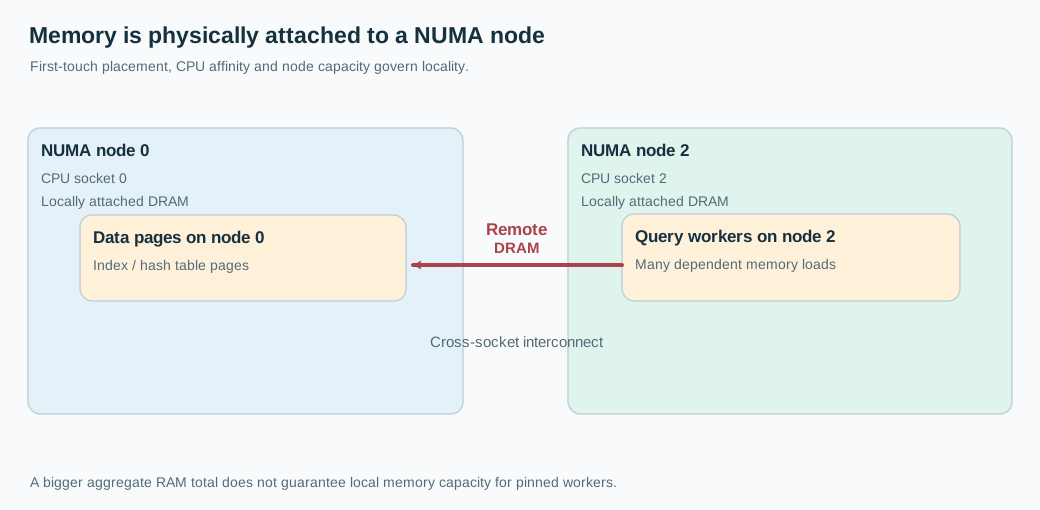
A single machine can contain several distinct memory neighborhoods. The process sees one virtual address space, but physical memory may be attached to different CPU sockets. Access to memory near the executing CPU generally has a shorter path than access to another socket's memory, and remote traffic consumes interconnect bandwidth. Adding sockets therefore adds resources without making their latency identical.

That is different from running out of memory. The operating system may have abundant free pages overall while threads repeatedly access remote pages. At the application layer it looks like ordinary pointer chasing, hash-table lookup, or B-tree traversal becoming slower. The CPU is waiting for bytes that exist, just not near the core asking for them.

CPU threads placed on NUMA node 2 repeatedly access pages allocated near node 0, while a locality-aware layout keeps processing near the pages.
Think first

An analytics database holds 90 GB of hot columnar data. Its four NUMA nodes each provide 48 GB RAM, and queries frequently scan ten independent partitions. Propose three placement strategies, say when each is worse, and describe an experiment isolating locality from memory bandwidth.

Take a few minutes to form an approach, then compare it with the worked explanation.

Check the exercise numbers

One 48 GB NUMA node cannot hold a 90 GB resident working set. Two nodes provide 96 GB in total, leaving only 6 GB before OS, allocator and query workspace costs, so they may still be too tight. Four nodes provide 192 GB, leaving 102 GB gross headroom before those costs. Compare interleaving, locality-aware partitions and a capacity-sufficient bound placement; ten partitions do not imply an even 9 GB each unless data distribution is measured.

Reveal the worked explanation

How the data ended up on the wrong node

Many Linux allocations follow a local-preferred policy: physical pages are generally assigned when first touched, subject to memory policy and allowed-node constraints. The thread that initializes a large cache can influence which NUMA node owns its pages. Suppose one startup thread builds a 90 GB memory-mapped index on node 0, then the query workers are scheduled across nodes 0 through 3. A large portion of their random lookups can travel across socket boundaries.

Another possibility is that the process is pinned to cores on one node while the requested memory cannot fit there. Pages may be allocated remotely or allocation can fail under stricter binding policies. The correct outcome depends on the memory policy, node capacity, cpuset, page placement, and kernel behavior. Do not assume the scheduler automatically fixes everything or that every remote allocation is a bug.

Random access is especially sensitive. A database performing many dependent pointer dereferences might stall on each memory access before it knows where the next pointer leads. A sequential scan can sometimes prefetch effectively and achieve high bandwidth, even if some pages are remote. So I would look for a workload-specific signal, not simply say that NUMA always makes memory slow.

Measurements that distinguish NUMA from a slow database

Start with hardware topology: lscpu, numactl --hardware, socket layout, and which NUMA nodes a database process is allowed to use. Inspect memory placement via /proc/<pid>/numa_maps, or controlled tooling that presents the per-node distribution. Check cpuset boundaries and whether container orchestration has actually reserved particular CPUs and NUMA nodes.

Then measure the running workers. Are threads migrating across sockets? What share of memory references is local versus remote according to available performance counters? Are last-level-cache misses and memory access stalls elevated? perf and platform-specific NUMA counters may help, but exact event names vary by processor. Compare query classes, not just overall QPS. An index lookup dominated by random memory access can show a very different response from a full-table scan.

I also want to rule out false leads: lower processor frequency on the new SKU, SMT differences, a new kernel, changed page sizes, memory bandwidth saturation, or another tenant using the interconnect. A 30% latency regression after migration is an observation, not automatically proof of remote memory.

A controlled experiment beats a NUMA slogan

Run the same representative read-only workload on a constrained CPU and memory placement within one socket, using enough local capacity. Then test spreading workers across sockets while leaving memory placement fixed, and finally a policy that places workers and their allocated pages together. Keep QPS, warm-up, page-cache state, and memory footprint comparable.

Binding is not free. If node 0 holds only 64 GB, you cannot bind an honest 90 GB active working set to that node and expect it to fit. A strict memory bind may fail allocations rather than spilling anywhere. An interleave policy can distribute memory across nodes and smooth bandwidth demand, but that deliberately sacrifices some locality. For a workload dominated by bandwidth rather than access latency, this may still be a better outcome.

Another design is to split the database into independent partitions or processes whose workers and hot pages live close together. Each partition owns a subset of keys or files. A request coordinator routes queries to the right owner and combines results when needed. That introduces cross-partition query costs and operational complexity. It is not a free improvement if most requests need every partition.

Database cache policy complicates the picture

Some databases use application-managed buffer pools. Others rely heavily on the operating system page cache. Anonymous buffer-pool pages, mapped files and file-cache pages may respond differently to memory policies and migration. Huge pages, transparent huge pages, page migration, and automatic NUMA balancing can change the practical result. Do not assume one numactl switch relocates every page an already-running process touched.

Think about warm-up. A process that builds a cache with one initializer thread and later launches workers across four sockets can recreate poor placement on every deployment. Startup placement, allocator arenas, thread affinity and the ownership model should be designed together. Otherwise a benchmark that starts workers differently from production can give a misleading answer.

The Principal-level decision is whether this should be one enormous shared-memory process at all. Sometimes a two-socket machine with fewer, faster local accesses wins. Sometimes four sockets deliver the needed capacity if data and computation are placed intentionally. Capacity planning needs memory topology, not only the sum printed by free.
Go deeper

Linux NUMA memory policy includes default/local-preferred behavior, binding, preferred nodes and interleaving. Task policies, VMA policies, cpusets and first-touch allocation influence final placement. A CPU's last-level cache and coherency behavior must be distinguished from DRAM placement. NUMA counters can be platform- and workload-sensitive, so use a topology-controlled performance experiment. Strict binding can fail when the chosen nodes lack capacity. Automatic NUMA balancing and page migrations can help some applications while hurting carefully pinned ones.

Check your reasoning

  • Explain the distinction between process virtual address space and physical NUMA locality.
  • Inspect CPU binding, page placement and memory policy together.
  • Rule out changed CPU frequency, cache misses or bandwidth saturation.
  • Compare controlled local, spread and interleaved placements with enough capacity.
  • Explain when data partitioning is worth added coordination complexity.

Common mistake: If the total machine has free RAM, a process pinned to a full NUMA node always allocates its next pages locally.

A larger NUMA server slows memory-heavy queries. Which investigation and experiment best separates placement from raw capacity?

Read the answer explanation

Evaluate page placement and worker affinity and compare local versus spread layouts — Available RAM system-wide is not the same as capacity inside a strict NUMA binding.

Apply it elsewhere

A Java inference server holds model weights in off-heap memory and handles one request per GPU-adjacent CPU worker. Determine how to map CPU cores, RAM placement and workers while avoiding unnecessary socket crossings.

Compare your approach

First-touch and policy, remote-access versus bandwidth stalls, hardware topology, cpusets, controlled pinning, per-socket capacity, workload partitioning and actual regression evidence.

One more constraint

If `free` shows 70 GB available system-wide, does that guarantee a process strictly bound to a node with 2 GB free can allocate another 10 GB there?

Quick revision

NUMA makes physical memory access cost depend on where a thread executes relative to where its pages live. A bigger multi-socket host can slow random lookups if workers repeatedly read remote pages. Inspect CPU affinity, page placement, cpusets, cache misses and remote-access indicators. Compare controlled local, spread and interleaved workloads. Strict binding needs enough local capacity. Use placement or partitioned ownership only when it improves the target query mix without imposing larger coordination costs.

References